
Imagine going a week without your cell phone and smartwatch. It’d feel pretty strange, right? They’re just electronic devices, but they’re incredibly intertwined in our lives beyond calling and texting. We use them to count steps, set reminders, even adjust the thermostat when we aren’t home.
Unfortunately, cell phones make it really easy to cheat on online exams. Even if you use basic proctoring software, it’s difficult to catch because the way test takers use phones to cheat is more complicated than texting a friend or searching the internet from a hidden phone. It puts exam integrity and your program’s reputation at risk, and it can cost you time (and probably money) when your content is leaked online.
How are cell phones used to cheat on online exams?
Using AI assistants and “homework help” apps
Cell phones can give test takers access to AI assistants, visual search tools, and “homework help” apps. A phone can sit just outside the webcam’s view with the camera pointed at the exam screen, so the test taker can use it to capture exam content in several ways:
- Invisible AI” assistants can use large language models to process what the test taker sees or says, then display AI-generated answers within seconds (think of it like a chatbot teleprompter).
- Visual search tools like Google Lens use the phone camera to read text, formulas, diagrams, or images from the exam screen and provide answers.
- Homework help apps like Quizlet, Brainly, and Chegg can create a similar off-screen risk when a test taker searches, types, or copies part of the test item into the app.
The image shows a smartphone sitting just outside the webcam’s view.
The phone has an invisible AI assistant on screen that’s being reading the exam question and providing an answer.
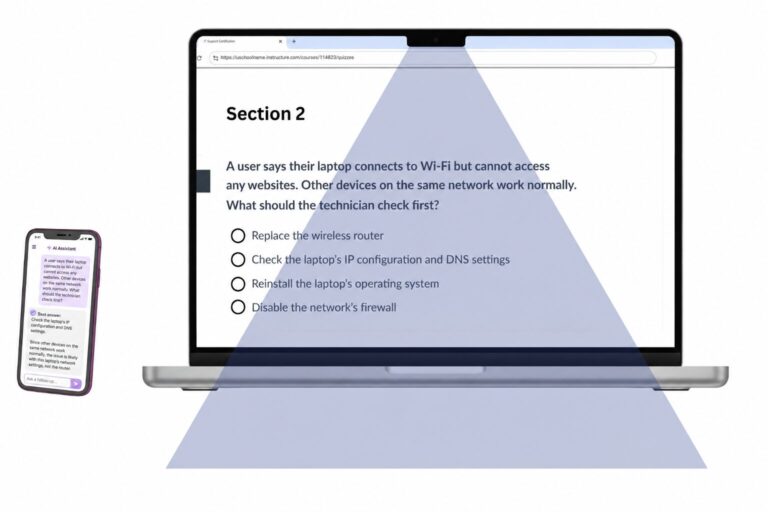
Example "invisible AI assistant" on desktop
Asking Siri, Alexa, and other virtual assistants
A test taker could keep a smartphone just outside the webcam’s view, cover their mouth, and quietly ask Siri, Alexa, or another AI assistant for answers. However, many exam proctoring services offer sound detection to catch this type of behavior.
The only problem is that sound detection, which is different from speech detection, flags nearly any noise.
Coughing or sneezing? Flagged.
Family being loud in the other room? Flagged.
Dog barking at the mailman? Flagged.
Those flags may have nothing to do with misconduct, yet they can distract test takers and create more review work for admins.
Smartwatches and other wearable devices
A smartwatch can give a test taker many of the same answer sources as a phone, just from the wrist. It can receive text messages, show saved notes, and access other unauthorized content.
Screensharing and screen mirroring
A test taker could use screen mirroring to send their phone’s display to another device outside the webcam. The phone could stay hidden under the desk, while the off-camera device displays search results, messages, AI answers, or other unauthorized content.
Taking photos of exam content to share with or sell to others
A test taker can use a mobile phone outside the webcam’s view to photograph or record exam questions directly from the screen. And if the proctor software is just a basic browser lockdown tool, they wouldn’t have to hide their phone at all.
Those images can end up on homework-help sites, online forums, group chats, and/or being sold as “study guides” or paid “practice exams.” When that happens, your exams are compromised and you’ll probably need to replace the question or entire exams.
Can proctored exams detect phones and other devices?
Yes, proctored exams can detect phones and other devices, though detection methods vary by platform. Some proctoring systems use automated detection to identify nearby phones, tablets, smartwatches, and other secondary devices. Many rely on a human proctor observing a device through the webcam in real time. Visual detection alone has limitations because a phone hidden off-camera can still activate a voice assistant or pair with earbuds or a smartwatch nearby.
Can Honorlock detect cell phones?
Yes, Honorlock can detect cell phones, tablets, smartwatches, and other devices during proctored online exams. Its patented phone detection toolkit flags visible handheld devices, detects nearby Apple devices, and prioritizes suspected device use for live proctor review.
How does Honorlock detect cell phones?
Honorlock detects cell phones through a combination of proctoring technology and live proctor review. This includes detecting when devices are visible or nearby.
- Handheld Device Detection flags visible mobile phones during the exam. It can also flag other handheld devices, such as calculators, unless the exam admin has selected settings that permit calculators for that assessment.
- Apple Handoff Detection, which is exclusive to Honorlock, can detect when Apple devices are nearby in the testing area. If a test taker is seen using a cell phone during the exam, the proctor can mark the session with a violation.
Smart voice detection listens for voice commands that activate AI assistants on nearby phones or other devices, such as “Hey Siri” or “OK Google,” flags those commands, and alerts a live proctor.
All violations for suspected use of smartphones and other unauthorized smart devices are reviewed and verified by a human proctor to give you confidence in your exam results. Honorlock’s proctors are also trained to spot cell phones that can be seen in reflections or light emitting from the phone.
Smart speech detection
Honorlock’s speech detection is ideal when test-takers use voice commands to activate voice assistants like Siri or Alexa on a device hidden from the webcam.
It listens for specific keywords and phrases that activate and operate voice assistants, such as “Hey Siri,” “Alexa,” or “OK Google.”
This approach allows test takers to speak aloud while solving problems without being unnecessarily flagged and interrupted. It also creates a better testing experience compared to remote proctoring solutions that use sound detection, which can flag unimportant sounds like coughing or a dog barking.
Second camera monitoring and workspace scanning
A second camera gives proctors a wider, side-angle view of the test environment, so they can see the desk, hands, workspace, and materials outside the main webcam’s view. This makes it easier to confirm that phones, notes, extra screens, and other unauthorized resources are not used during the exam. Before the exam, test takers can use their phone to complete a workspace scan, and Honorlock verifies the uploaded photo to confirm the space is set up properly.
Example workspace scan
Finds leaked test content
Instead of manually searching the internet for leaked test questions, Honorlock’s Search & Destroy™ automatically scans the internet for every exam question within minutes.
It shows where compromised questions appear online, then gives admins a one-click way to request takedowns. Those results help faculty, certification teams, and exam admins decide which items need to be removed, revised, or replaced.
While Honorlock’s online proctoring system can detect phones and other smart devices to prevent cheating, the real benefit is that it creates a fair assessment environment for honest test takers where scores measure what they actually know and the validity of your exam results is protected.