
Browser lockdown software may check the box for entry-level proctoring needs, but it’s really easy to work around.
If it doesn’t really prevent cheating, is it worth the cost investment? Nope.
If you’re investing in an online proctoring platform, it should be able to detect and prevent all aspects of exam cheating while remaining cost-effective.
Consider this: If you’re only proctoring online exams with a browser lockdown solution, test takers are still able to do the following without detection:
- Use their cell phones to look up answers
- Snap pictures of test questions to share with others
- Allow other people to take the tests for them
- Take tests with other people in the room
- Use books, notes, and other resources for help
The examples above are just a few of the many reasons that only using browser lockdown software isn’t enough to protect online exams and probably isn’t worth the investment.
Is the browser lockdown software preventing cheating in the examples above? Not really.
If it isn’t protecting academic integrity, is it worth the investment? Definitely not.
Are there other proctoring platforms that can comprehensively deter cheating on exams and still be cost-effective? Yes, and we’ll show you.
What is a browser lockdown and how does it work?
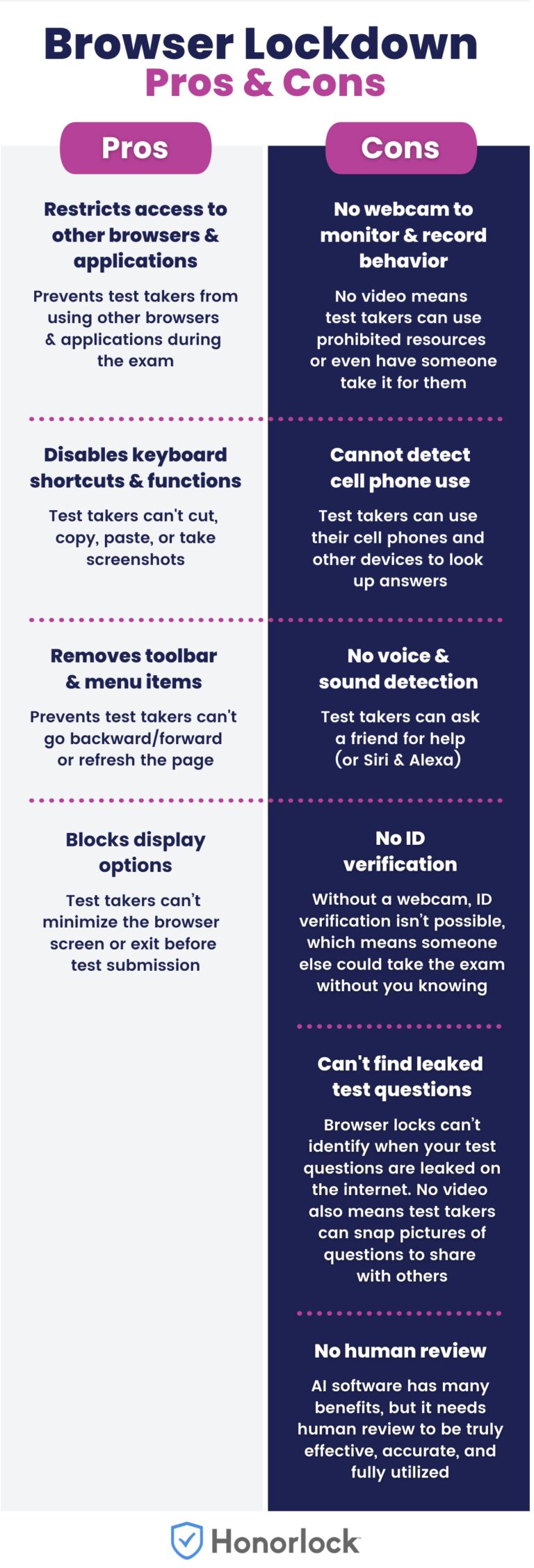
Browser lockdown software is an entry-level online proctoring platform that helps prevent cheating by restricting access to other websites and applications and disabling keyboard functionality.
As you can see from the comparison chart below, the limitations of browser lockdown software greatly outweigh the benefits it provides.
So, what’s a better online proctoring platform?
To comprehensively prevent cheating, protect academic integrity, and support test takers, you need a blended proctoring platform that combines AI with human review.
How does an online proctoring platform like this work?
The proctoring platform uses AI to monitor each exam session for potential academic misconduct and alerts a live proctor to join the test takers’ session in real-time if it detects any issues.
What are the features and benefits of a blended proctoring platform?
In addition to a browser lock, when you use a proctoring company like Honorlock, you’ll get these features and benefits:
- Cost-effectiveness and scalability: Honorlock’s online proctoring services and platform are available at a flat rate cost per exam or per test taker. This includes implementation of the online proctoring platform, training, and 24/7/365 live, multilingual support at no additional cost.
- Blocks AI tools: Prevent the use of AI chatbots, browser extensions, “invisible” assistants, as well as proxy remote access software and other platforms.
- Protects exam questions and content: Search & Destroy technology searches the internet to identify leaked exam questions. If leaked exam content is found, test administrators are given simple steps to take control of their exams’ integrity by sending content takedown requests in one click and updating exam content.
- Monitors behavior from all angles: The device’s webcam and an option second camera can be used to monitor behavior throughout the exam, and provides test administrators with timestamped recordings and reports afterward.
- Detects voices, not just sounds: Smart voice detection software won’t create endless flags for test takers coughing or talking to themselves during an exam.
- Instead, the software listens for specific keywords or phrases, such as “Hey Siri” or “OK Google,” and alerts a live proctor to intervene if necessary.
- Customizes exams in a few clicks: Honorlock makes it easy to customize proctored exams in just a few clicks. The test administrator creates the exam in the LMS like they already do, and then they’ll just click to choose which test proctoring features to enable or disable. They can also provide the exam instructions for further customization for each exam and even specific test takers.
- Proctor exams in different formats: The blend of AI and human review along with the ability to provide detailed proctor instructions and test rules means that whether it’s multiple-choice questions, math problems using pen and paper, written assignments, or open book formats, all exam formats will be secure.
- Detects cell phones and other devices: Flags visible cell phones and other handheld devices, such as calculators, unless the exam admin has selected settings that permit calculators for that assessment.
- Verifies identity: ID verification is quick and simple with Honorlock. The proctoring software uses the webcam to capture a picture of the test-taker along with their photo ID.
- Provides on-demand proctored exams with live support: Exams can be taken 24/7 without scheduling and live, multilingual support is available within seconds.
- Reduces test anxietyThis blended solution uses AI to monitor exams and a live proctor will only intervene if potential issues are detected. This means the live proctor won’t be watching the test-taker the whole time.
- Integrates with your LMS: A direct integration between Honorlock’s proctoring software and the LMS is key because it creates a familiar test environment and there are no extra passwords or logins needed.
- Honorlock also integrates with third-party platforms, such as MyMathLab, ALEKS, Pearson, and McGraw Hill.
Honorlock’s online proctoring platform and service helps. higher education institutions, credentialing organizations, and corporations of all sizes protect against all aspects of cheating on exams, not just one.