

Templated AI Resources
Current State
Contradictions & misalignment
AI has been a hot topic and an issue for a few years now, and institutions are still figuring out how to respond to AI. Most institutions are taking action, but that doesn’t create consistency across an institution.
The bigger issue is the lack of coordination, with just 14%1 of institutions having a comprehensive, institution-wide AI policy…14%
That means 86% of schools are still operating through separate efforts instead of a shared plan. Faculty and students feel that inconsistency, especially when expectations change from one class to another.
Faculty burden
Without an institutional policy to work from, faculty become the default decision-makers. Individual instructors are left to determine what AI use is acceptable, what counts as misuse, how students should disclose it, and how assessments should be handled.
Faculty autonomy isn’t the problem.
The problem is that most are making these calls without consistent policy language, clear examples, or reliable and consistent training from their institutions. Some instructors are comfortable with that. Others are still figuring it out or avoiding it entirely because expectations are unclear, and no one’s really making progress. In all three cases, without campus-wide support and guidance, the issue gets pushed down into individual classrooms.
Student experience
And that inconsistent support creates an inconsistent student experience that can also impact outcomes. They can use AI in one class with rules that are clear and specific, then head to their next class where there are vague guidelines or none at all. So, students are have different rules depending on which class they walk into.
Different rules for different courses isn’t a huge deal, though. Instructors just need to over-communicate their rules and things should be fine.
But imagine two students who are in the same program taking the same required courses, but with different sets of instructors (for the sake of this discussion, assume they have the same set of professors until they graduate).
- One set of instructors does not use AI in course activities and does not permit students to use it for any reason
- The other teaches students how to use AI responsibly and includes AI use in relevant course activities
They earn the same degree, but only one leaves with real experience using AI thoughtfully and effectively. The other leaves without any hands-on practice. To be clear, that doesn’t mean one received a better education, but it does mean that they leave with different levels of experience with a tool many companies now expect people to use.
Students aren’t waiting
Most students—anywhere from 63-85%1,2 or more—are already using AI, with or without guidance, because they realize how important it will be for their future careers. Honorlock’s student AI survey of just over 1,000 students found that roughly 30% are making or seriously considering academic changes based on how they think AI will affect their careers.
And 55% believe that AI will actually be more relevant than their degree.2 They’re also using AI to get some unauthorized “help” on exams and assignments. 36% report using AI to help answer quiz and exam questions2, and about 1 in 5 have used it to write an entire essay.1
Students clearly aren’t waiting to be taught. They’re already deciding for themselves how to use these tools and most want their institutions to provide resources and training, but only 31% say their school offers any formal training on professional AI use, and of those, fewer than 1 in 5 have actually taken it.
Whether that comes down to availability, scheduling, or poor communication, the result is the same: students aren’t receiving the AI guidance they want and need.
Citations
1 Inside Higher Ed’s 2025 Provost Survey
2 Honorlock’s Winter 2025 Student AI Survey
AI Resources & Training Materials
Add Your Heading Text Here
Lorem ipsum dolor sit amet, consectetur adipiscing elit. Ut elit tellus, luctus nec ullamcorper mattis, pulvinar dapibus leo.
AI Policies
Use this prewritten AI policy language for courses, with options for a block, allow, or mixed approach. Faculty can choose the version that fits their course and fill in the blanks with their course rules. It gives them a solid starting point without having to write a policy from scratch.
AI stance language
AI tools are allowed in this course. You are responsible for the accuracy, appropriateness, and academic honesty of what you submit. Any AI use must be acknowledged and documented in an AI Use Disclosure Note, following the requirements in this syllabus and any added directions within an assignment
AI tools are not permitted for work in this course unless an assignment explicitly states an exception. Any AI use that is not explicitly permitted for a task may be treated as academic dishonesty.
AI rules vary by assignment in this course. Each assignment will state what AI use is allowed for that task. If an assignment does not mention AI, assume AI use is not permitted for that task. When AI is permitted, you must acknowledge and document it in an AI Use Disclosure Note, following the requirements in this syllabus and any added directions within the assignment.
AI tools are allowed in this course. You are responsible for the accuracy, appropriateness, and academic honesty of what you submit. Any AI use must be acknowledged and documented in an AI Use Disclosure Note, following the requirements in this syllabus and any added directions within an assignment
AI tools are not permitted for work in this course unless an assignment explicitly states an exception. Any AI use that is not explicitly permitted for a task may be treated as academic dishonesty.
AI rules vary by assignment in this course. Each assignment will state what AI use is allowed for that task. If an assignment does not mention AI, assume AI use is not permitted for that task. When AI is permitted, you must acknowledge and document it in an AI Use Disclosure Note, following the requirements in this syllabus and any added directions within the assignment.
Templated AI policy language
Sample course AI policy
AI use in [COURSE NAME]
[PASTE ONE STANCE OPTION FROM THE LIST BELOW]
Approved AI tools
- Approved AI tools for this course: [LIST APPROVED TOOLS, OR WRITE “Any tool is allowed”]
- Tools that are not allowed: [LIST, OR WRITE “None”]
- Account rules: [School accounts only, personal accounts ok, or both]
Where AI may be used
- Coursework types covered by this statement: assignments, discussions, quizzes, exams, projects, presentations, labs, group work
- Course-specific notes: [ADD ANY SPECIAL RULES]
Transparency and documentation
If you use AI at any step, include an AI Use Disclosure Note with your submission unless the assignment directions say otherwise.
Your AI Use Disclosure Note must include:
- Tool and version: [example: tool name, version/date if available]
- What you used it for: [brainstorming, outline, editing, study help, code help, image help, etc.]
- What you did yourself: a short statement of your original contribution
- Prompts: paste the prompts you used, or provide a link to the shared chat if allowed
- Output used: quote any text copied word-for-word and label it as AI output
- Citations: follow [CITATION STYLE OR DEPARTMENT RULES]
Accuracy, quality, and responsibility
- You are responsible for what you submit, even when AI contributes words, ideas, code, or images.
- AI can produce incorrect facts, fake citations, biased claims, or material that does not fit the assignment. Verify claims with course materials and credible sources.
Privacy and sensitive information
- Do not enter private student data, personal identifiers, grades, or any restricted course materials into external tools unless the assignment directions explicitly permit it.
- Follow [INSTITUTION OR DEPARTMENT PRIVACY RULE] for any data you share with third-party services.
Exams and quizzes
- AI use is not permitted during graded assessments.
- If an assessment permits AI use, the directions will state what is allowed and what documentation is required.
Group work
- Follow the assignment directions for group work.
- If AI use is allowed for group work, all group members must agree on how it is used and how it will be documented.
Academic honesty and consequences
- Using AI in a way that violates this course statement or an assignment’s directions counts as academic dishonesty under [INSTITUTION ACADEMIC HONESTY POLICY NAME].
- Consequences for unauthorized use: [LIST PENALTIES, SUCH AS redo for partial credit, zero on the task, report to academic integrity office, etc.]
Questions
- If you are uncertain about what is allowed for a task, contact [INSTRUCTOR CONTACT METHOD] before submitting.
Rules for individual assignments
Short version, AI allowed
AI tools are allowed for this assignment for [list allowed uses]. You may not use AI to produce the final submission or substantial portions of it unless these directions explicitly permit it. Include an AI Use Disclosure Note with your submission that lists the tool, purpose, prompts or a shared chat link, and what text or ideas you used.
Short version, AI not allowed
AI tools are not permitted for this assignment. Do not use AI to generate, rewrite, paraphrase, summarize, outline, or produce any part of what you submit. If you are uncertain, ask before submitting.
Chatbot Prompting
AI prompting is a rare skill that requires relentless study and discipline reserved for a select few. Mastery takes years, and even then, most never make it past the basics. Just kidding.
AI prompting is simple. Just be clear and provide context. Most importantly, ignore all the nonsense terms and jargon that make prompting sound way more technical than it is. Most of them just put names on things people already do when they talk to an AI.
Prompting 101
What’s a prompt?
A prompt is the message you type into a chatbot or other generative AI to tell it what you want. Prompts can be a question, requesting help, or giving it a task like summarizing text, generating code, and even translating text to other languages.
What’s prompt engineering?
Prompt engineering is just how to write your requests to get the response you’re looking for from a chatbot. “Engineering” makes it sound technical, but for most educators, you just need to be clear and specific about what you want and provide details to help the chatbot tailor its response.
What’s the best chatbot for educators?
The best chatbot really depends on what you’re trying to create or accomplish. For writing tasks, ChatGPT and Claude are your best bet. If it’s technical writing, Gemini is a good option. You can compare chatbots here.
AI prompt examples and templates
Use these prompting examples and templates as a starting point, and tailor your prompt with information specific to your assignments and assessments.
Template: Based on the text I provided, create [number] [question type] questions to assess [audience] on their understanding of [topic(s)]. [Q&A requirements and specifications.]
Example: Based on the text I provided, create 30 multiple-choice questions to assess participants preparing for a Food Safety Manager Certification exam on their understanding of methods to prevent cross-contamination. Each question should be objective, concise, and written in plain language. Provide four answer choices per question, with only one correct answer.
More tips on how to write better exam questions.
Writing objective exam rules is waaaay trickier than it seems. Many times, rules that seem crystal clear can still be misinterpreted by test takers. Here’s a complete guide with examples of objective exam rules, and you can give the prompt below to a chatbot.
Prompt to use: Create objective online rules for test takers. The rules should comprehensively address:
*Behavior (e.g., no talking or using cell phones to look up answers)
*System requirements (e.g., computer with a functioning webcam and microphone)
*Test environment (e.g., quiet room, clear desk/surface, no other people present)
Use direct, unambiguous language that leaves no room for misinterpretation. Provide the rules in a numbered list that can be copied and pasted into the assessment platform/LMS.
Here are two examples of basic test rules followed by improved versions. Use the improved versions as examples of the level of clarity and specificity expected as you create the set of rules:
*Rule 1 (basic): No talking during the test.
*Rule 1 (improved): No communicating with other individuals by any means, whether verbal, non-verbal, or electronic.
*Rule 2 (basic): Your desk must be clear of all items except for the device you use to take the test.
*Rule 2 (improved): The testing area and any surface your device is placed on must be clear of all items except the device used to complete the test. This includes books, papers, electronics, and other personal belongings.
Note: When you type an asterisk (*) at the start of a line, chatbots, generally speaking, get the gist that you’re trying to create a bullet point.
Note: This prompt template is just that: a template—a starting point. You’ll really need to fill in the blanks with as much information and context as possible—learning goals, topics/subjects, specific characters, realistic issues and scenarios—to help the chatbot tailor the case study to your course needs.
Create a [length]-word case study about [specific scenario/situation] for [audience, e.g., undergraduate business students, professionals in a certification program, etc.].
The case study should include:
*Comprehensive, realistic background information about [scenario/situation]
*Key characters, stakeholders, and/or groups involved
*Specific opportunities, challenges, and decision points for the learner to evaluate
*Five short-answer questions that require in-depth problem-solving and a proposed plan to address the situation
I’m a [job role] using this image in my [online course module, presentation, article, etc.] about [subject/topic]. Please write the following for the image:
- Descriptive alt text (approximately 125 characters or fewer)
- Detailed image description for accessibility
- Suggested file name (use lowercase letters and hyphens, no spaces)
- Text caption to display alongside the image
Note: You can upload images to most AI chatbots like as ChatGPT, Gemini, and Claude.
Template: Based on the following [question type] questions, create a [alternative question type] question(s) that assesses the same underlying concepts or skills. The new question should encourage [objective/outcomes (e.g., critical thinking and practical application rather than recall)]. [Add questions here.]
Provide a clear explanation of your reasoning for how you adapted the original questions into this format. Then, include a concise description of what an appropriate student response should contain.
Example of the 1st paragraph from above: Based on the following multiple-choice questions, create an essay question that assesses the same underlying concepts or skills. The new essay question should encourage critical thinking and practical application rather than recall. [Add questions here.]
Note: If you’re repurposing the question for a different audience or subject, briefly describe them so the chatbot can adapt its response.
Learn more about writing better exam questions.
Template: Based on the project instructions I provided below, create a rubric that evaluates [add what’s being assessed, e.g., specific skills and competencies]. Each item should include [type of performance scale, e.g., a five-point numeric scale from 1 to 5 (1 = Novice, 5 = Excellent) or a three-point scale with the levels: Excellent, Developing, and Needs Improvement].
Format the rubric in a [type, e.g., table or chart] to use in [format, e.g., Word Doc, Google Sheets, LMS, etc.]. Here are the assignment details and instructions: [add information]
Example: Based on the project instructions I provided below, create a rubric that evaluates practical application skills. Each item should include five performance levels using a numeric scale from 1 to 5 (1 = Novice, 5 = Excellent).
Format the rubric in a table to use in a Word Doc and include a column for written feedback. Here are the assignment details and instructions: [add information]
Write an engaging two-part discussion prompt for [audience, e.g., undergraduate business majors, adult learners in professional development programs, etc.] focused on [topic/subject/situation].
Part 1 (initial response): Prompt learners to connect their real-world experiences and/or prior knowledge to [topic/subject/situation] by sharing specific examples or situations that highlight how the topic applies to their personal, academic, or professional life.
Part 2 (respond to peers): Ask learners to review and analyze at least two of their peers’ posts and respond with [e.g., thoughtful questions, alternative viewpoints, etc.] to extend the discussion.
Prompts that summarize text—whether it’s an entire research paper or a paragraph from an article—can be as simple as, “Summarize this.”
But you can also ask the chatbot to summarize it in specific formats or focus on certain topics. Just copy and paste the text into the chatbot or upload the document, then start the prompt with something like “summarize” or “simplify” (or any other related terms), and then include details on the length, format, and focus.
Here are a few example prompts you can try:
- Summarize this research study into 2-3 concise sentences, then provide bullet points on the important information in each section, especially the sections about data collection methods and results.
- Simplify this text and explain it in practical, easy-to-understand language.
- Explain what this text is saying in simple terms that [audience] can understand.
- Shorten this text into a [resource type, e.g., study guide, FAQ, etc.] for [audience].
Tips to write better prompts
Providing specific, relevant details improves the chances of getting the response you want.
Think of writing a prompt like ordering a sandwich. Just saying “turkey sub” may do the trick, but it might not be exactly what you wanted. What if you’re craving sweet peppers and cheddar cheese? What if you’re really hungry and end up with a tiny sub?
Be specific with your order. 10-inch turkey sub on an Italian roll. Add lettuce, tomato, sweet peppers, and extra cheddar cheese. Light mayo.
Do the same with your prompts.
We ask chatbots to do tons of things, but at their core, chatbots are built to converse. It’s done its job by replying, not replying with 100% accuracy.
They aren’t inherently designed to conduct research, verify information, or solve math problems. They can help with those tasks, and some even have features like “Deep Research,” but those are just extensions of their original purpose.
That said, always, always, always fact-check chatbot responses because they don’t generate text based on facts. They just predict what word is most likely to come next.
Don’t worry about order
Chatbots use machine learning to process your whole prompt at once, so the order of the information you provide usually doesn’t matter that much in most cases. Just focus on providing the right information.
Write naturally
Chatbots “understand” everyday language, which includes slang, sarcasm, and even significant typos. So, don’t worry about perfect commands. Just write to it like you would to a real person and it’ll usually get the gist of what you’re saying.
Regardless if it’s a public or private chatbot, don’t include any personally identifiable information or sensitive organizational details in your prompts or files you upload (Excel, Word, etc.).
Anonymize information to protect learners, yourself, and your organization. For example, use “University/Company ABC” instead of your company name, or “Student/Employee A” instead of specific names.
How to Cite AI
AI citation is one of the most misunderstood aspects of using these tools, especially now that they can generate images, video, graphics, and and other types of media.
The examples below provide templates for in-text citations and references for APA, MLA, and Chicago. Visit our article for copy-and-paste templates for citing AI-generated images, videos, and other media.
Use our automated AI citation generator
AI Citation Generator
Pick the citation style, add info, copy and paste itReference
Parenthetical citation
Narrative citation
Reference list entry
- Template: Author. (Date). Title (Month Day version) [Additional Descriptions]. Source
- Example: OpenAI. (2025). ChatGPT (May 14 version) [Large language model]. https://chatgpt.com/
In-text citations
- Parenthetical citation: (Author, Year) (OpenAI, 2025)
- Narrative citation: Author (Year) OpenAI (2025)
Works cited MLA AI citation
- Template: “Prompt text” prompt. Title of Container, Day Month version, Publisher, Day Month Year, location.
- Example: “Explain how Edgar Allan Poe used alliteration in his writing” prompt. ChatGPT, 14 Jan version, OpenAI, 10 Feb 2026, https://chatgpt.com/.
MLA AI in-text citation example:
- (“Explain how Edgar Allan Poe used alliteration in his writing”)
In most cases, you can simply acknowledge the AI tool in your text (e.g., “The list of farm animals was generated by ChatGPT”).
However, if you need a more formal citation for a research paper, for example, you’d add a numbered footnote or endnote like this: Text generated by Claude, Anthropic, Feb 12, 2026, https://claude.ai/.
If you’ve edited the AI-generated text, just mention it at the end of the note, like this: Text generated by Claude, Anthropic, Feb 12, 2026, https://claude.ai/. Edited for style and content.
Resources to Prevent AI Cheating




Centralized AI Tools Page Template
AI tools are used across different departments for different tasks, so it helps to have one simple page that shows which tools are approved, who can use them, and what information/data can be entered. Without a shared reference, people make assumptions, departments interpret rules differently, and sensitive information can end up in the wrong place. The text below includes sample website copy and a starter table template with example tools that you can adapt to fit your institution’s approved tools, access rules, and data policies.
This page lists AI tools available to faculty, staff, and students, along with who they’re available to Use the chart to pick the right tool for your task and confirm data limits before you paste text or upload files. If you are unsure, choose the option with the lowest data level or use a tool approved for more sensitive information.
Note: The “Data” column shows the highest data level allowed for that tool. If your content is above that level, do not paste or upload it into that tool.
Tool | Overview | Uses | Availability | Data |
|---|---|---|---|---|
ChatGPT | General-purpose chatbot for text, documents, and Q&A. | Draft and revise text, create learning materials, write or debug code, generate images. | Students, faculty, staff | Level 1–2 |
NotebookLM | AI research assistant that answers and develops resources using the files and links you provide. | Generate summaries, study guides, conversational podcasts and more based on files you upload. | Students, faculty, staff | Level 1–2 |
Google Gemini | Google’s AI assistant for writing, research, data analysis, and other academic or administrative tasks. Available through the university’s licensed version with institution-managed access and data protections. | Content creation, (text, images, video, and music), writing code, building presentations. | Students, faculty, staff | Level 1–3 |
Tool | Overview | Uses | Availability | Data |
|---|---|---|---|---|
ChatGPT | General-purpose chatbot for text, documents, and Q&A. | Draft and revise text, create learning materials, write or debug code, generate images. | Students, faculty, staff | Level 1–2 |
NotebookLM | AI research assistant that answers and develops resources using the files and links you provide. | Generate summaries, study guides, conversational podcasts and more based on files you upload. | Students, faculty, staff | Level 1–2 |
Google Gemini | Google’s AI assistant for writing, research, data analysis, and other academic or administrative tasks. Available through the university’s licensed version with institution-managed access and data protections. | Content creation, (text, images, video, and music), writing code, building presentations. | Students, faculty, staff | Level 1–3 |
Data levels context
Use these data levels to decide what information can be entered into each AI tool. For example, a public event announcement would fit a lower level, while student records, payment details, or health information would fit a much higher level. If you are not sure which level applies, use the higher data level until you confirm the correct one.
Level 1: Public, non-confidential information intended for open sharing and reuse
Level 2 Internal, non-confidential information shared within the university or a specific unit
Level 3: Confidential information shared only with people who need it for their role. Most university data, including most personal data, fits in this level
Level 4: Restricted confidential data such as regulated personal identifiers, account and payment details, health data, credentials, security secrets, trade secrets, and contract-limited data
Level 5: Federally protected data with the strictest requirements and the highest risk, including use cases tied to life safety systems
AI Tools to Explore
Check out our AI for educators page for the latest tools, with real examples and honest feedback on how they actually perform.
Writing tools
Press Ctrl+D or Cmd+D (Mac) to bookmark this page
ChatGPT can help you with every part of the writing process, whether it’s brainstorming lesson plans and drafting presentation content or writing objective exam rules and clear assignment instructions. It can also generate different types of text, edit and improve clarity, and adapt content to fit the needs of diverse learners.
- Best for: Creating instructional content, generating creative discussion prompts and case studies, checking grammar and punctuation, summarizing research, and adjusting text for different student levels and accessibility needs.
- Limitations: May produce generic or inaccurate content and requires fact-checking, especially for subject-specific accuracy.
Much like ChatGPT, Claude is a versatile writing tool for educators. It stands out for its ability to interpret and respond to complex prompts with greater nuance and contextual awareness while avoiding cookie-cutter language.
- Best for: Developing comprehensive course materials and in-depth resources like study guides and supplemental materials, as well as writing clear assignment instructions and providing structured feedback.
- Limitations: Can be less versatile than ChatGPT and may require more specific instructions to achieve desired outputs.
Google’s AI assistant, Gemini, is a flexible tool for educators that can generate text, images, and code. Its capability to create different types of content is especially useful for lesson plans that include visuals, coding exercises, or interactive materials.
- Best for: Research-based writing, developing multimedia-rich instructional content, creating visual aids and coding examples, and generating structured study materials.
- Limitations: Gemini’s writing capabilities are improving, but there’s still a noticeable gap in depth and creativity compared to ChatGPT and Claude.
Microsoft Copilot is an AI assistant built into Microsoft apps (Word, Excel, etc.) and is also available as a standalone chatbot. It runs on the same large language model as ChatGPT but is geared more toward productivity and organization rather than creative writing.
- Best for: Creating course materials within Microsoft apps, summarizing research, and assisting with administrative writing tasks and organization.
- Limitations: May not be ideal for highly creative or in-depth content that requires more flexibility.
Whether you’re asking technical questions for school/work, looking for life advice, or just yappin’ about how your day was, Pi is the perfect chatbot for it.
It’s built on its own homegrown LLM and designed to be more of a conversational partner than a “copilot” assistant. It can help you incrementally think through ideas, organize and process your thoughts and emotions, and work through tough choices with empathetic, thoughtful responses.
Another cool thing—and, surprisingly, a rare feature that the other popular chatbots don’t offer for some reason (it’s just text-to-speech)—is that Pi lets you choose from several realistic-sounding male and female AI voices with different accents to read its responses aloud.
You can chat with Grok like any other chatbot, but it was developed to function as more of a reasoning agent to handle complex tasks. It breaks the tasks you give it into multiple steps with specific substeps to conduct searches for the right information, compare sources, and run quick tests before it replies.
- Best for: Complex tasks involving math, reasoning, data analysis, and coding.
- Limitations: Pulls sources in real-time, which need to be checked for trustworthiness. Interjects humor when it isn’t prompted to, which can be annoying.
Perplexity looks and feels like a chatbot, but it’s technically a conversational AI search and answer engine, which is why it’s the best at answering questions while citing its sources.
It scours the internet to find answers to your questions, then summarizes everything in a clear and concise way that’s easy to digest, and provides links to find out more.
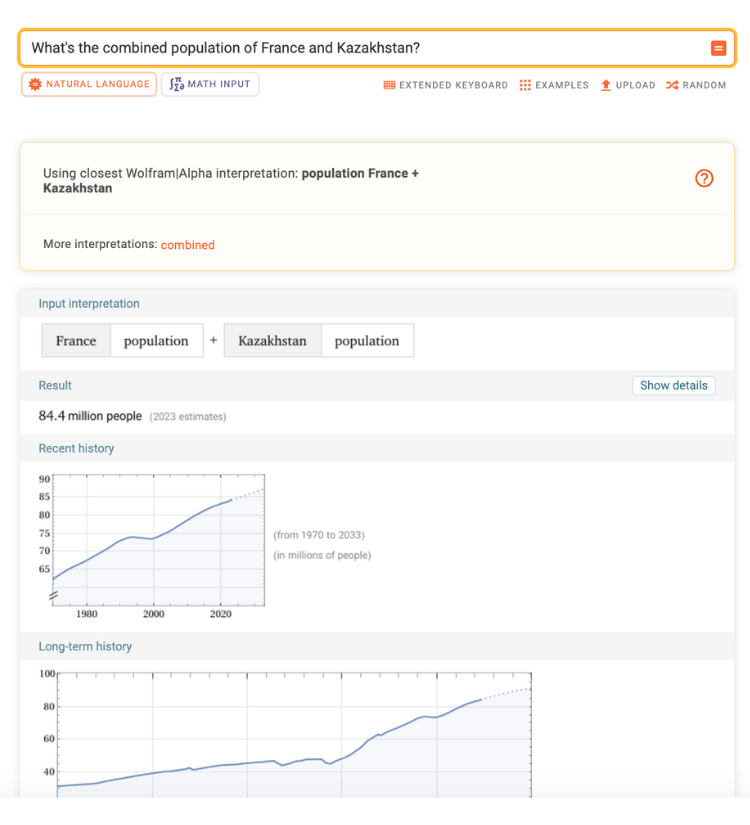
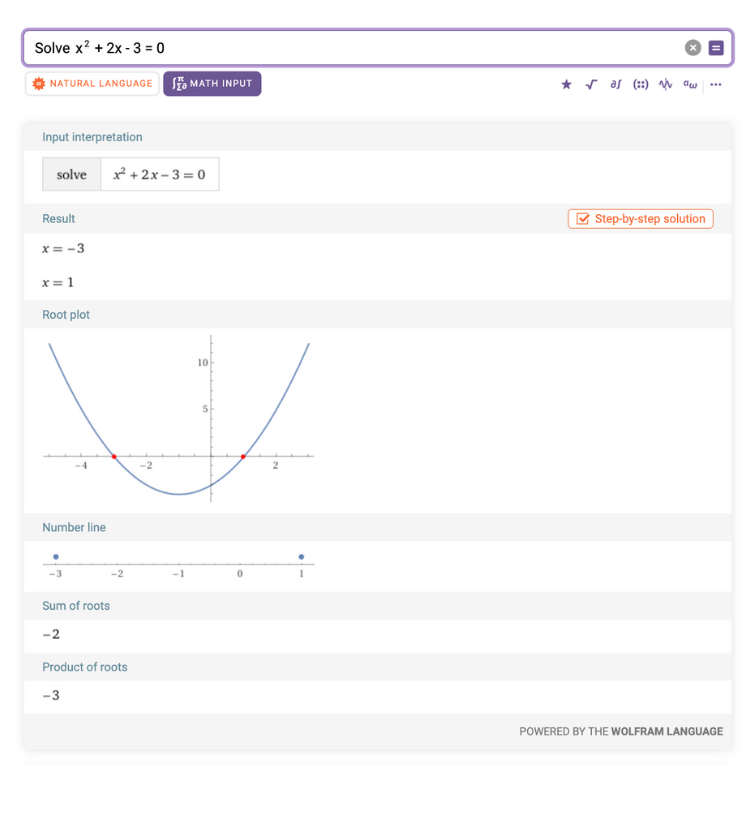
Wolfram Alpha isn’t a chatbot, but it’s still relevant to mention here because it has some similar features and it’s extremely useful for anything math or science-related.
It’s a computational knowledge engine, which is a form of AI. Put simply, it understands what you ask (like a chatbot does), and it answers your question using algorithms and its internal knowledge base. However, it doesn’t chat with you or provide links; it only provides computed answers.
Most AI writing assistants, like Grammarly, QuillBot, Linguix, and Hemingway App (great for improving clarity), work similarly—you paste your text, and they correct grammar, spelling, and punctuation. They also offer features to adjust tone and simplify text, which can help when writing assignment instructions or test questions.
Rytr is an AI writing assistant that’s mostly used by businesses, but it’s just as useful for educators who need to quickly draft class announcements, discussion prompts, or assignment descriptions.
It has technical editing tools and dozens of templates to streamline short-form content, but it isn’t ideal for long-form content and research-based writing.
Lex is a versatile AI writing tool for educators who want a distraction-free writing experience. Its interface is simple, offers AI editing, and has focus features like dark mode and a built-in Pomodoro-style timer (REALLY cool).
It helps with drafting course materials, research papers, and professional communications. It also keeps data secure and your writing isn’t used to train its AI models.
The only downside is that the free version is really limited—it only allows you to check your writing 30 times each month. The pro version is $12-18.
SciPub+ is an AI academic writing tool designed to help researchers and educators with each step in the academic writing process.
It has 10 specialized AI assistants that help with different steps (introduction, methods, results, and discussion, etc.) and it’s built to keep everything structured and aligned with scientific standards.
Sudowrite is an AI creative writing assistant—maybe not the first tool that comes to mind for educators, but hear us out—with tools that help with brainstorming and planning, creating more descriptive text, and building out simple ideas into a cohesive story.
How’s this useful for educators? It can help craft case studies that won’t put students to sleep, create narratives for writing-intensive assignments, and develop interactive learning materials. It’s also a great tool for creating interesting and engaging discussion prompts, icebreakers, and presentation copy.
Basically, it’ll help make your course content a lot more fun.
Scholarcy is an easy to use AI summarizer that organizes the content into a digestible format. You can put any information into it, like your notes or a research study, and it’ll summarize it and you can ask questions about it.
It supports these file formats: PDF, Word, Powerpoint, HTML, XML, LaTeX, TXT, CSV, RIS, BIB, NBIB
NotebookLM allows you to upload PDFs, websites, YouTube videos, audio files, Google Docs, or Slides and summarize them or turn them into detailed outlines, study guides, and FAQs.
NotebookLM previously developed audio podcasts, mind maps, flashcards, etc. based on the sources you upload to it. But now it also creates slide decks, infographics, quizzes, and videos. They aren’t perfect, but they’re honestly pretty solid overall.
You use its preset studio tools (FAQ, study guide, briefing document, podcast, infogrpahics, etc.) and questions it generates from the text and save the responses to your notebook. You can also ask it specific questions and it’ll answer with cited information from the text.
SciSummary is an AI tool built to summarize scientific articles. It uses custom-built GPT models to summarize complex scientific articles and make them easy to understand. They also offer features to expand on specific information and it recommends other relevant articles to expand your own research.
Elicit is an AI tool that summarizes papers, extracts data, and synthesizes information. Similar to the other summarizer tools, you can ask it questions and expand on information. And, like SciSummary, it suggests other relevant research articles.
AI voice & audio tools
Voice generation AI has come a long way. It used to sound like robots, but now they sound pretty realistic.
Educators can use voice generation AI to update previous videos, add narration to case studies, and create audio explanations for complex topics.
Here are some AI text-generation tools to try:
- WellSaid Labs
- Speechify
- ElevenLabs
- Murf.AI
This recording was created using WellSaid Labs.
NotebookLM allows you to upload documents, blogs, slides, and videos which are turned into very realistic summary podcasts in just a few minutes.
We provided our Why Students Cheat ebook to NotebookLM and it generated a 34 minute podcast covering each and every aspect. Here’s a clip of the first few minutes.
Descript is a popular all-in-one podcasting tool that allows you to record, transcribe, edit, and repurpose the audio and video.
Audioread is a text-to-speech AI that allows you to listen to articles, PDFs, emails, etc., in very natural voices.
Descript and its AI assistant, Underlord, help edit and improve audio (and video) by removing filler words and background noise, translating captions into different languages, and automatically creating clips of particularly important information.
Although, some reviews mention that some aspects of the platform are difficult to use and that it’s expensive at scale.
Ignore the “podcast” in the name.
This AI tool by Adobe makes any voice recordings, whether they’re for a podcast or voice overs for a presentation or class lecture, sound clear and professional.
Its editing features are pretty great too. It transcribes the audio and you basically just edit it like a word document.
Nomono has an option for editing/improving audio, and another for capturing it.
For editing and improving, Nomono’s AI removes unwanted noises and improves voice quality, and offers simple editing tools.
If you wanted to capture audio in a large classroom or lecture hall, they can use Nomono’s “Sound Capsule.”
You’ll need a big budget, though—the Sound Capsule costs $2,490. If your department has the budget, faculty could place the capsule and its supplemental microphones around the room to capture high-quality audio, which would be especially useful for large classrooms and lecture halls. After that, the AI can improve the audio and it can be edited as needed.
Notta can accurately transcribe classes and meetings and translate them into almost 60 languages. It can also identify who said what and it can summarize everything.
The reviews for Notta has a 4.5/5 rating on G2 after more than 150 reviews.
There’s a free version or a pro version for $9/month.
Fireflies.ai is a comprehensive AI note taking tool for instructors and students to use in the classroom or during online classes. It offers transcripts, organized notes, and complete recordings of each class or meeting.
Fireflies has over 600 G2 reviews and a 4.8/5 rating.
There’s a free option and a pro option for individuals that costs $10/month.
Otter is a popular AI meeting tool that transcribes speech in real time. It’s an affordable option for instructors and students to transcribe what’s said in class, identify the speaker, and summarize notes.
Otter has a 4.3/5 rating on G2 after close to 300 reviews.
It has free options and the paid options range from around $8-20 per month.
Educators can use music generation AI to make lessons more engaging, whether by bringing history and culture to life with music from different eras or turning complex topics into songs that reinforce key concepts in a memorable way.
Udio was really easy to use and created diverse songs about any topic. It takes you through a few quick steps to pick the music style (rock, blues, country, etc.), write lyrics for you (or use your own), and adjust settings before creating a song. Udio can also create instrumental songs in any style you’d like.
1-minute samples of songs below.
Prompt: Create a blues song about the parts of a cell and how they work.
Prompt: Create a blues song about the cognitive load theory and why it’s important.
Suno functions just like Udio does; you choose the style, it writes lyrics, or you provide them, and it creates a song from scratch. You can also use Suno to create instrumental songs in any style. 1-minute examples below.
Prompt: Create a rock song about the parts of a cell and how they work.
Prompt: Create a relaxing blues song about the cognitive load theory.
Canva: The AI music generator is a solid option for simple background music, although, probably not the best for dramatic video.
Soundverse: Good for a diverse range of instrumental music.
Beatoven: Another solid tool for instrumental background music.
Faculty AI Training Plan
This faculty AI training program was built to provide practical training that faculty can immediately apply to their courses. The training progresses from establishing AI literacy (knowing about AI) to AI fluency (actually using AI) through hands-on practice and the creation of materials to use in their courses, so faculty can use AI with clear prompts, careful review, and clear student directions. Then the training shifts to designing assignments and assessments that align with faculty course goals and needs, either by intentionally incorporating AI into coursework or reducing unauthorized use.
This template will need to be tailored to fit your institution. The content and format will look different for each institution and even individual departments at the same institution, so the training will need to be tailored to faculty needs, course formats, and the types of assignments and exams used.
Survey faculty before developing the program to identify what training they need the most and which formats to use. Conduct another survey after training is complete to understand which information and activities helped faculty the most, and what should be changed for future training.
This module gives faculty the baseline knowledge needed to make good decisions about AI in teaching. It focuses on how generative AI works, why it isn’t perfect, and risks to consider before you use it in your courses.
What you’ll learn:
- AI basics and terminology: Learn the basics about how AI works and important terms to know as you begin to use it
- Why confident output can still be wrong: Hallucinated facts, weak sourcing, and “sounds right” failure patterns
- Limits and bias: Where AI output can be biased, incomplete, or overly generic, and how to identify it when it happens
- Data protection and ethics foundations: What not to share, student data considerations, and responsible boundaries
What you’ll make during this module:
- A written justification for how and why AI can or cannot be used in your courses
This module moves from knowing about AI to using it. You’ll practice writing and revising prompts for your course, review outputs before you use them, and learn to make better decisions about your uses of AI based on your course goals, student needs, and potential risks.
What you’ll learn:
- Choosing and using AI responsibly: Making better decisions about when and how to use AI in your courses by focusing on tasks where it can help, recognizing risks, and deciding how much you personally need to read, edit, and confirm before you use anything AI produces.
- Prompting 101: Learn what a good prompt entails and tips on how to write them.
- Prompt 202: Practice customizing prompts to your specific needs for different aspects of teaching and learning.
- Output review: Use a quick set of steps to check accuracy, sources, tone, and fit with your course before sharing anything with students.
What you’ll make during this module:
- Reusable prompts for your course.
This module shows you how to communicate your rules and expectations of AI use with your students by creating a course policy and language for exams and assignments so they know how AI can/can't be used and what they need to disclose.
What you’ll learn:
- Communicating rules and expectations: Establish how students can and cannot use AI in your courses and specific coursework.
- Copyright and attribution basics: Learn how to cite AI so you can show students how to do it and create awareness and understanding about when they need to cite its use.
- Student verification: Teach students how to verify AI-generated outputs.
- Grading strategies: See how to use AI for drafting and organizing feedback while you still review it, revise it, and assign the grade.
What you’ll make:
- Course AI use policy for the syllabus
- Student policy comprehension check
- Assignment-level AI use rules
This module focuses on practical ways to design assignments and assessments that prevent AI cheating and encourage deeper learning (even in large courses).
What you’ll learn:
- Plan: Learn how to identify the learning goal, decide what you will grade, and define what student work will count as evidence of learning.
- Design: Learn how to write prompts that require students to genuinely apply what they’ve learned and explain their reasoning.
- Structure: See how to break an assignment into stages when options like authentic/hands-on tasks aren’t possible.
- Review: Learn how to verify that cited sources exist and match the claims, compare work to earlier submissions when you have them, and ask students to explain key choices in their own words.
What you’ll make during this module:
- A list of realistic assessment options you can use in place of tasks that are easy to outsource to AI
- Clear language to include in assessment instructions that states what AI use is permitted, not permitted, and what students must disclose.
This module helps you use AI specifically for your subject, class size, and course format. You’ll build an activity or assignment that uses AI in a defined way and gives students objectives rules and directions.
What you’ll learn:
- Discipline-based applications: See examples that match your subject and the kinds of assignments you already use.
- Learner-focused activities: Design an activity that uses AI intentionally while still requiring students to give their reasoning and evidence.
- Teaching students to better use AI: Show students how to write better prompts, ask better questions, and verify AI-generated content.
What you’ll make during this module:
- Course activity with objectives rules and guidelines for AI use