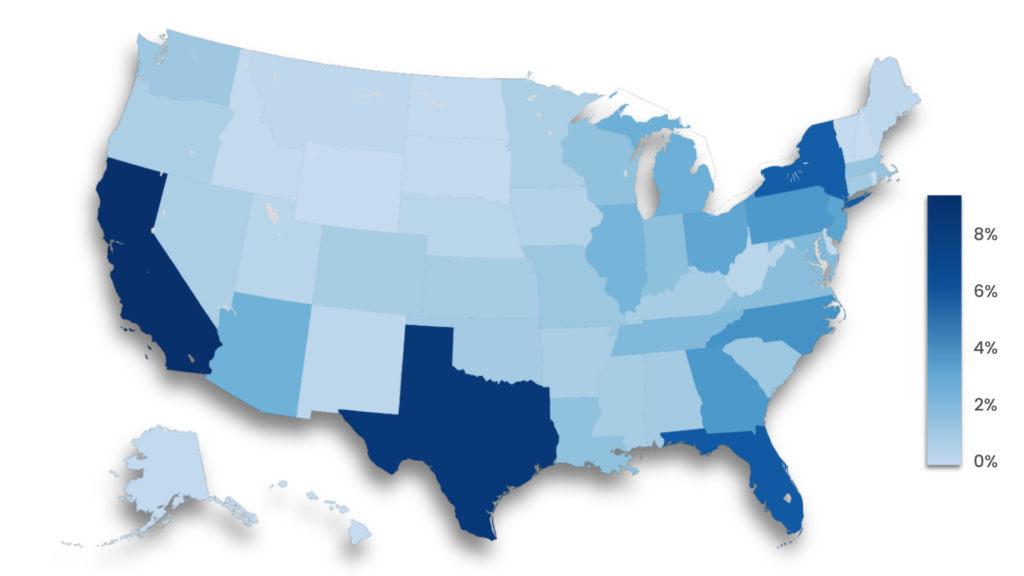
Students surveyed across the US
Survey details
Honorlock developed this survey to better understand college students’ AI use, the training they receive, and how AI may affect their careers. It was a blind survey distributed September 23–26, 2025, through a third-party vendor specializing in consumer research.
The 1,005 respondents were U.S.-based college students ages 18–34. The survey was conducted online, took approximately 2–3 minutes to complete.
Demographics
- Age: Most respondents (85%) were 18–25, while the other 15% were 26-34.
- Gender: Respondents were primarily female (75%). Males accounted for 23%, with 2% identifying as other or non-binary.
- Ethnicity: Over half identify as White (51%), with others identifying as Black or African American (27%), Hispanic or Latinx (21%), Asian or Asian American (10%), and smaller percentages across other ethnic groups. The total exceeds 100% because respondents could select more than one option.
- Location: Most respondents live in suburban areas (44%), followed by urban locations (31%) and rural areas (18%). 7% preferred not to state their location.
Students surveyed across the US
The results of this survey show a clear disconnect between how students use AI and how higher education institutions are responding. Some institutions moved quickly with clear policies and structured guidance, but many are either stuck in a gray area with no real direction or are still trying to catch up.
Most students already use AI to improve their writing and as a tutor to explain concepts and answer questions. The problem is that the same tools can give feedback on a draft and answer practice questions just as easily as they can write the essay for them and answer real exam questions.
If that’s already happening (and there’s a good chance it is), how long can your institution wait to respond? What’s the cost of staying in that gray area where there’s some guidance, but not enough to really make a difference?
These findings, along with the strategies and resources we provide in this article, can help your institution move in the right direction, build alignment and policies on AI use, communicate them clearly to students, and protect academic integrity.
AI tools & usage
The AI tools students use and how they use them to complete their coursework.
Most students (63%) use AI for at least some of their coursework; however, it’s also important to note that over a third (38%) rarely use AI tools or don’t use them at all.
This shows that while AI is a regular tool for most, there are varying levels of comfort and acceptance among students.
(more than 50%)
Over half of students (56%) have been required to use AI on at least one assignment, with 22% experiencing this across multiple courses.
Decisions about requiring AI use can come from individual instructors, but they may also be made at the department level. So, students can have very different levels of AI experience even at the same institution.
Most students use AI grammar and editing tools (59%) and generative text tools (57%), with a smaller but still decent portion (22%) using AI research summarizers.
However, only 11% use AI image and video generation tools, which may be because they aren’t useful or relevant for most coursework. It could also be because until recently, AI tools were much better at generating text than images and videos.
However, AI image and video generation tools have improved A LOT over the last year or so.
AI blooper video
Check out our AI tools directory for tons of examples of how AI can support teaching and learning.
Type | % |
|---|---|
Grammar & editing (e.g., Grammarly & QuillBot) | 59% |
Generative text (e.g., ChatGPT & Claude) | 57% |
Research summarizers (e.g., Elicit & Perplexity) | 22% |
Image/media generation (e.g., DALL-E & Midjourney) | 11% |
None of the above/other | 15% |
Students mostly use chatbots to brainstorm ideas, explain concepts, summarize readings, and improve their writing. More than a third also say they use chatbots to help answer quiz and exam questions.
That last part’s the real problem here.
And because this is self-reported data, the true number is probably higher because negative behaviors such as cheating are usually underreported on surveys, even when they’re anonymous (Newton & Essex, 2024).
When students use AI to answer quiz or exam questions, it moves from “tutoring” to cheating (unless the instructor allows it). This is why it’s so important to have clear rules about when AI is allowed during assessments and using proctoring technology to detect and prevent any AI use.
Training
Student perceptions of available AI training resources at their institution.
Less than a third of students (31%) say their college or program offers classes on how to use AI in business or professional contexts, while 43% say it doesn’t, and 26% are unsure.
This means that institutions either haven’t built trainings or full courses that teach students how to use AI in professional settings or haven’t communicated it well enough, since over a quarter are “unsure” of whether their institution offers them.
Question 5 showed that about 1 in 3 students know their school offers these classes, so why have fewer than 1 in 5 actually taken one?
Maybe the classes don’t fit their schedules, maybe they don’t think they’ll need AI in their careers, or they feel confident in what they already know for now.
Working around schedules will always be a challenge, but there’s a real opportunity to help students who don’t know what they don’t know. They may assume they won’t use AI at work, but there may be ways they don’t know or haven’t considered yet. Or they may feel like an advanced AI user even though they’ve only scratched the surface of what different tools can do.
Plus, AI tools are evolving so quickly that there’s always something new for everyone.

3 out of 4 students
have not taken any classes on how to learn/use AI tools in business or professional contexts.
45% of students think their school should put more resources into teaching AI for post-college careers, 33% say it shouldn’t, and 22% are unsure.
This split makes it tricky for leadership to decide how much time and resources they should invest in AI training for students.
On one hand, close to half of students think their school should put more resources into AI training, but there’s still a third that disagrees, which is a pretty big group.
The 33% who said no makes sense based on previous responses, like how 31% say their school offers AI classes, but only 18% have actually taken one, which could be because they just prefer to learn AI on their own or don’t think it’s worth their time.
AI's impact on future careers
Student perspectives on AI use at work in the future.
AI hasn’t influenced most students’ (58%) choice of major, and it even reinforced 13% of students’ decision to stay in their major.
Some students (7%) moved away from fields they think are vulnerable to AI, while 5% switched to AI-related majors, 9% added AI credentials, and another 9% are seriously considering changing their major because of AI’s potential impact.
Those are small percentages individually, but they add up to about 30% of students who are making or considering academic changes because of how they think AI will affect their work in the future.
Statements | % |
|---|---|
1. I changed my major from a field I felt was vulnerable to AI to one I believe is more secure. | 7% |
2. It influenced me to change to a major more directly related to AI. | 5% |
3. It encouraged me to add an AI minor or certificate to supplement my major. | 9% |
4. I have seriously considered changing my major because of AI, but haven’t done so yet. | 9% |
5. It reinforced my decision to stay in my major. | 13% |
6. AI has not influenced my choice of major. | 58% |
This is definitely one of the most interesting findings of this survey because more than half of students believe AI will be more relevant than a college degree, even though they’re currently working toward a college degree.
What drives those opinions? Some is obviously because they believe it’ll change how most jobs are done, but there are plenty of questions to consider:- Are they skeptical about a degrees holding their value?
- Do they see AI as a more tangible skill they can show?
- Do they think the ability to apply AI is a marketable skill that’ll differentiate them?
The takeaway for institutions: build AI skills into your programs and make the value of earning a degree from your institution clear and visible to current and prospective students.
More than 8 out of 10 (81%) students are confident in their ability to use AI tools at work in the future.
But the other 20% still aren’t confident in their ability to use AI tools at work in their future careers.
Nearly half of students (47%) expect to use AI daily or weekly in their careers, 14% expect to use it monthly, and 39% expect to use it rarely or not at all.
This indicates that many students see AI as a normal part of their work in the future. However, a significant number don’t expect to use it often, or at all. This could be related to the field they’ll work in, or it could be because they’re underestimating how much AI will be integrated into their field.
Strategies for leadership
Practical strategies to help your institution align AI policies and training with students’ real AI use.
Squash the degree vs. AI story
55% of students who participated in this survey believe AI will be more relevant than their degree, so colleges and universities of all shapes and sizes need to be very clear that the degree and their ability to use AI aren’t exclusive. You can have one AND the other.
Generally speaking, the simplest message is that their degree provides the foundation of their knowledge to even know where, when, and why to use AI along the way.
Show students how AI can tie into their careers
Show students exactly how AI can potentially impact and be applied in the fields they’ll work in some day. Work with employers and alumni to identify real ways AI is used in specific roles/fields, then turn those into projects, labs, and case studies that mirror actual work.
When students see AI used for real work in business, healthcare, education, public service, the arts, and technical fields, they may stop seeing it as just a novelty item that can help them get their school work done and start seeing it as a legitimate part of their future job.
For example, a marketing major can use AI for market segmentation or audience analysis, not just editing their writing. This ties AI practice to the actual work students expect to do, which matters especially for the 47% who expect to use AI daily or weekly in their careers.
Bonus tip: Try booking some alumni, either as individual speakers or on a panel to discuss how AI is used in or has changed their field. These can be in-person or virtual sessions.
Proctor exams and written assignments
Given that at least 36% of students said they use AI to answer exam questions, you need a hybrid proctoring solution (combines AI with live proctors) to prevent it from happening.
Using hybrid proctoring means that whether students are…
- Taking an online exam
- Writing an essay in Word or Google Docs
- Building financial documents in Excel or coding in any development environment
… they won’t be able to do the following (unless the instructor allows it):
- Use chatbots, invisible AI assistants, or browser panels like Google’s homework helper to answer questions
- Ask AI voice assistants like Siri or Alexa for help
- Refer to unauthorized books or notes
- Paste pre-copied text written by a chatbot
- Search the internet on their cell phones
Offer consistent courses and trainings
Any training and resources that help students learn about AI are a step in the right direction, whether it’s a one-off workshop, a full module in a course, or an entire class.
But start with what makes sense and what’s realistic for your institution.
If you haven’t developed much yet, you might start with a page on the website or a 30-minute virtual lunch & learn to give students a basic introduction to AI tools. If your institution’s already further along with workshops and has clear policies and guidelines, the next step could be developing courses that show students how to use AI in their major.
Over time, if your resources allow it, aim to offer trainings on a consistent basis instead of as sporadic one-off events. But you may realize that you only have the resources to develop a brief site page or one-off trainings, and that’s perfectly fine.
Keep the momentum going because any progress is good progress.
Be clear about when AI is allowed or not allowed
Create a simple policy, such as this one that we adapted from the University of Florida’s AI guidance for faculty, which explains when AI is:
- Allowed
- Allowed with conditions
- Not allowed at all
Include real examples for each level and discuss them with students to make sure everyone’s on the same page. For example, you could explain that ethical AI use could include using it as an editor or tutor, for example, and then tell them what you consider AI cheating, such as having it rewrite text and answer exam questions for them.
Try using a traffic light analogy when you discuss it:
- Green (allowed): Brainstorming and outling a paper with NotebookLM
- Yellow (allowed with conditions): Using Grammarly to fix punctuation errors, but not rewriting text
- Red (not allowed): Answering exam questions and generating written responses with ChatGPT
Tip: Tell students which level of AI use is expected for each assignment so those taking multiple courses with different AI policies don’t have to guess from one class or assignment to the next.

Use all communication channels
Many students don’t think their institution offers AI training (which could be true) or aren’t sure if it does, so it helps to review what you offer and how you share it to figure out the best ways to communicate AI-related training and policies to students.
Think through all the communication streams your institution has available and how they can be used to distribute this information to students.
For example, sharing information on the school website, course catalog, student welcome materials, beginning-of-semester emails, signage around campus, and even social media. Whatever you do, just don’t bury this information in a hyperlink on a random page or in a syllabus.
Survey students, faculty, and staff
Survey your students, faculty, and staff about:
- How they use AI
- What tools they use
- What they still need help with
Use that information to decide which trainings, tools, and policies to develop NOW and which can wait. Try to keep the surveys short and focused, and if possible, conduct focus groups to get even more information.
Training tips
Survey your students, faculty, and staff about:
- How they use AI
- What tools they use
- What they still need help with
Use that information to decide which trainings, tools, and policies to develop NOW and which can wait. Try to keep the surveys short and focused, and if possible, conduct focus groups to get even more information.
For faculty
Potential topics to cover during faculty training:
- Break down how AI works: Help faculty understand what AI can and can’t do by explaining it in simple terms. Focus on the basics like its strengths, limitations, and how it actually generates responses.
- Prompting tips: Sharing example prompts and general tips can help faculty understand how it works and maybe even spark some new ideas for how they use AI in their courses.
- Show real examples in teaching: Demonstrate how AI can be used in different teaching situations, like for writing/rewriting test questions, adapting content for different uses (e.g., creating study guides based on PPT text). Let them try it out and/or use case studies to see how it fits into real classroom settings.
- Help design/redesign assessments and assignments: Work with faculty to build assignments that include AI in a clear and meaningful way. Tools like the TILT framework can help make the purpose and expectations clear to students.
- Discuss AI limitations and risks: Cover topics like privacy concerns, potential biases, and the importance of using AI ethically and responsibly.
- Teach faculty how to talk to students about AI: Help faculty explain how AI works, where it can be useful in coursework, and what its limitations are. They should explain and give examples of what counts as appropriate use, when AI is or isn’t allowed, how to cite it, and what would be considered misconduct.
For students
Students want training and support on all things AI—what it is, where it gets the information from, and how to use it during their course work (Deschenes & McMahon, 2024).
Topics to discuss with students:
- How to cite AI in different formats
- How to incorporate it into their coursework
- Guidance on how to create the right prompts
- Information on how chatbots work
- Details on limitations such as inaccurate information, biases, and privacy.
- Academic integrity
- Students prefer specific guidelines on AI use (Hamerman et al., 2024). So, thoroughly explain what’s considered academic dishonesty and talk through situations to help them understand what’s allowed or not.
Starting an AI initiative at your institution
Starting an AI initiative at your institution
Whether your institution is looking to integrate AI across all your courses or just starting small, here are a few good reasons to start:
- Recruitment & retention: Offering AI education and access to AI tools can help recruit and retain students and faculty.
- Committed & competitive: Integrating AI into teaching, learning, and research helps students and faculty build the skills they need to keep up, and it shows the institution is committed to staying ahead and focused on the future.
- Supports workforce & community needs: AI initiatives can build support from all sorts of stakeholders like industry partners, donors, and policymakers, while helping prepare students to use AI effectively in their future work.
Who's involved?
Champion(s)
Champions are the ones who get the ball rolling, keep things moving, and makes sure everyone’s on board and aligned. This person is usually involved in multiple areas.
Administrative leadership
Administrative leadership may include:
- President: Supports the initiative publicly and helps secure buy-in from trustees, donors, and external leaders.
- Provost: Leads and oversees academic integration of AI and guides the approval of new AI-related curriculum.
- Deans: Helps lead AI efforts within their colleges and keep faculty informed and involved.
Technology leadership
Depending on the institution, one or all of these roles may be involved to implement the technologies and systems and keep everything secure.
CIOs and CTOs play key roles in starting and maintaining AI initiatives by managing the systems, tools, and support needed to run AI across the institution. The Chief Information Security Officer (CISO) may also be involved, focusing on protecting data, reducing risk, and making sure AI tools meet privacy and security standards.
Funds & funding
- Chief Financial Officer: Oversees financial planning, budgeting, and cost management for the AI initiative, and supports long-term sustainability by aligning funding sources with institutional priorities.
- VP Advancement: Engages alumni and donors to support the AI initiative financially, positioning it as a transformative opportunity for the university.
Other considerations
- Accessibility compliance: While several roles we’ve mentioned may contribute, dedicated involvement from an Accessibility & Compliance Officer or similar roles helps support all learners and confirm that accessibility compliance standards like ADA and FERPA are met.
- Government affairs: Builds and maintains connections with state and federal leaders, as well as industry partners to attract funding and participate in larger industry initiatives/goals for AI in education.
- Communications and marketing: Raises awareness and interest, creates understanding, and builds support. This includes internal messaging to students, faculty, and staff, as well as external outreach to policymakers, donors, and the broader community.
Getting buy-in
You need students, faculty, and staff on board with AI initiatives. Students are usually more willing to adopt new technologies, especially if they’ll potentially be used in their future careers. But getting buy-in from faculty and staff can be trickier because some may not understand the purpose, or they simply might not be interested.
But regardless of where they’re at on that spectrum, there’s a decent chance that some are already using AI, even if they don’t really consider it to be AI. For example:
- Microsoft Word and Grammarly
- Siri and Alexa
- Google maps and Apple maps
The point is that those small wins—we use wins loosely here—can be a starting point that may lead to surveys and focus groups. Results from those may influence small-scale workshops and training for faculty.
And if you’re lucky, that might generate some interest and enthusiasm that’ll trickle down to those who are resistant or uninterested.
As interest grows, try hosting in-person and/or virtual events where students, faculty, and staff can explore AI. Don’t think of it as formal training, but more as an opportunity to learn about AI, have their questions answered, and test out some of the tools.
Resources
ebooks
Access eBook
Access eBook

Access eBook
Access eBook
Access eBook