Cluely is an “invisible” AI assistant built to cheat on everything has many in higher education and professional education concerned because it can be used to cheat during online exams. It even has employers nervous because candidates are using these AI assistants to feed them answers during virtual and technical interviews.
Unfortunately, about bajillion knockoff companies popped up immediately after Cluely. They all work the same way, so we’ll show you how they work and how to block them.
What is Cluely?
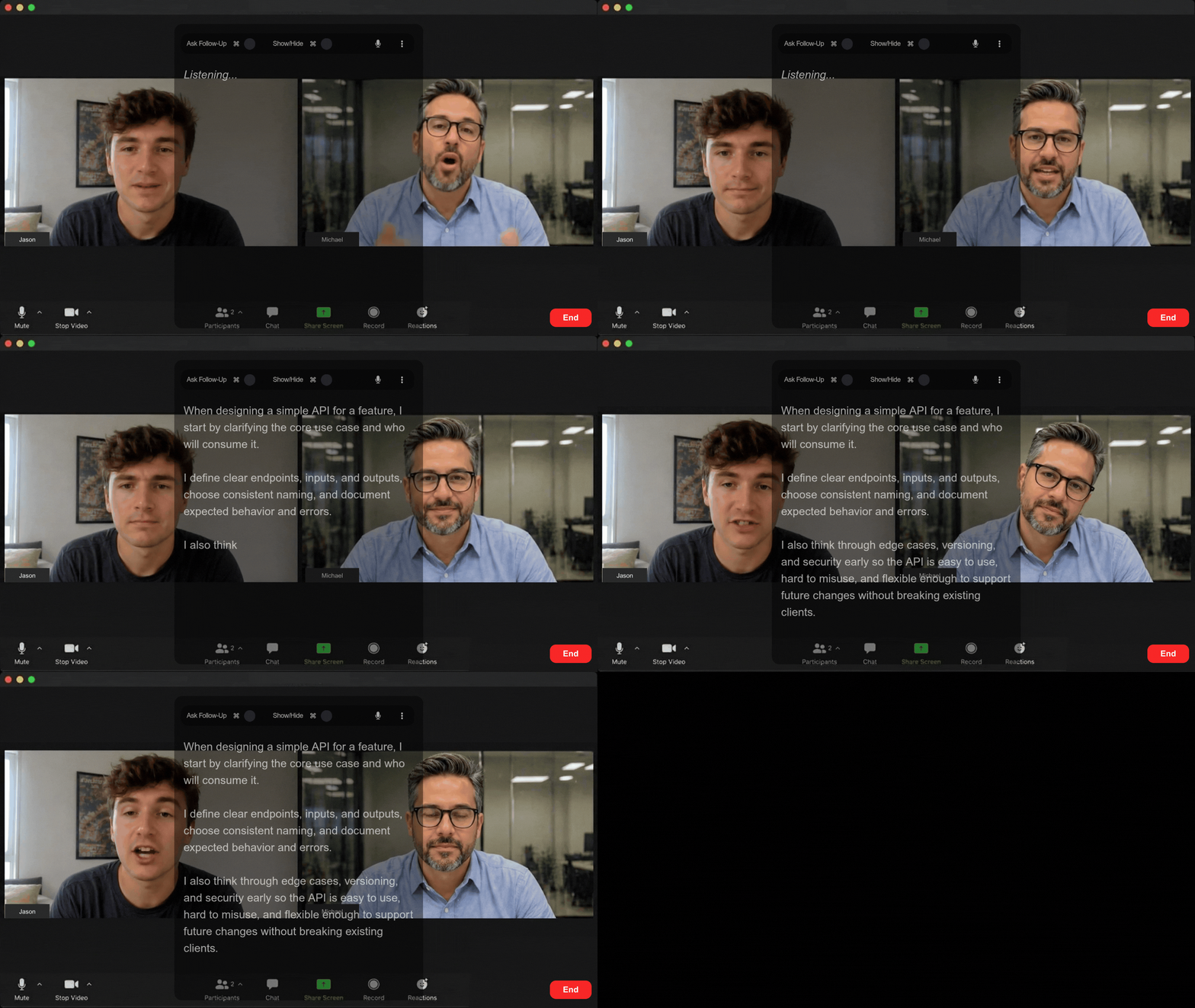
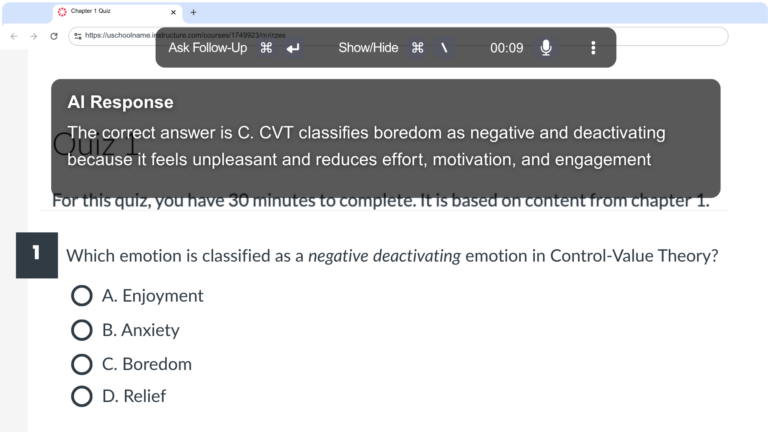
Cluely is an AI-powered desktop application that acts like an invisible live assistant that sits on screen as a transparent overlay that feeds users answers in real time. It can answer questions on the screen during an exam, or it can hear what the interviewer asks and write responses quickly enough for the user to read aloud and sound natural.
Think of it like a chatbot teleprompter.
Cluely and other similar AI make it really easy to cheat and they’re really difficult to detect.
Examples of how invisible AI assistants work
Is Cluely undetectable? Why is it so difficult to detect?
Cluely is difficult to detect because it hides activities by:
- Bypassing keyboard logging with hidden global shortcuts
- Masking tab activity with a transparent overlay that tricks the system into thinking the test taker never leaves the exam tab
- Staying invisible during screen sharing
Cluely intentionally hides these activities because it makes it almost undetectable. Almost.
Honorlock’s proctoring software makes it easy to detect and prevent the use of Cluely and all other AI tools. Exam admins can enable the Honorlock Application to block Cluely (and all other applications) during exams, assignments, interviews, presentations, and any other tasks you can think of. BUT, admins still have the flexibility to allow specific applications while block all others.
For example, you can allow test takers to use:
- Microsoft Word or Google Docs for proctored essays
- Excel for authentic tasks like building balance sheets or analyzing data
- Industry-specific platforms such as coding environments for technical interviews
- Virtual conferencing tools such as Zoom during interviews
Within a few clicks, exam admins can provide access to necessary software during traditional exams, performance-based assessments, and interviews while blocking everything else. However, institutions and companies also need to teach test takers and employees what ethical AI use looks like, where AI assistance is acceptable, and when it crosses the line into misconduct.
Other remote proctoring tools to secure integrity
In addition to blocking AI like Cluely, Honorlock’s hybrid proctoring solution, which combines AI with live proctoring, offers several tools to detect and prevent the unauthorized use of AI tools, such as ChatGPT, during online exams. Honorlock also provides extensive proctoring tools to protect exam integrity from every angle, such as:
- Detecting cell phones and other devices: AI detects cell phones and other secondary devices like tablets and smartwatches without relying on a proctor to catch them in real time.
- Identifying leaked exam content: Search & DestroyTM automatically searches the internet to identify leaked exam questions and provides a one-click option to send DMCA takedown requests.
- Verifying ID and scanning the room: Before the exam begins, the webcam is used to verify identity and scan the room for unauthorized resources like books, notes, secondary devices, and even other people.
- Monitoring behavior: Honorlock monitors and records test takers’ behavior and desktop activity during assessments, interviews, and other tasks.
- Detecting speech: Listens for keywords and phrases that potentially indicate cheating, such as “Hey Siri,” instead of flagging unimportant sounds like coughing or even a test taker speaking aloud as they work through a problem.
Honorlock integrates with Canvas, Blackboard, Moodle, D2L, Open LMS, Intellum, and Docebo, and provides open APIs for custom integrations. Exam admins also have access to in-depth, filterable reports with time-stamped HD recordings all in one portal.
Is Cluely safe?
Cluely carries basically the same amount of risk as any virtual conferencing tool. It collects audio, transcripts, screenshots, account data, usage data, and device information. The problem is that 16 subprocessors, including OpenAI, Grok, and Anthropic, can potentially access your conversations and/or data. Cluely doesn’t state what each subprocessor has access to, but given what it captures, we can only assume each one sees your conversations in some form, whether audio, text, or screenshots.
The risk is substantially greater for higher ed institutions and credentialing organizations during exams, and for companies during pre-hire processes.
- For higher ed institutions and credentialing organizations, Cluely compromises exam integrity, exposes proprietary exam information, and, ultimately, puts your program’s reputation on the line.
- For companies, it puts hiring decisions and internal data at risk. It can help unqualified candidates outperform qualified ones, which puts the wrong people in roles they should not have and gives them access to sensitive data that could be stolen, leaked, or sold.